


Chorefriend: Cleaning Schedule
4.798.00 Reviews
App Specs
- Version
- 1.0.26
- Updated On
- License
- Free
- Downloads
- 10,000+
- Developer
- System Two GmbH
- Categories
- House & Home
- Platform
- Android
Screenshots
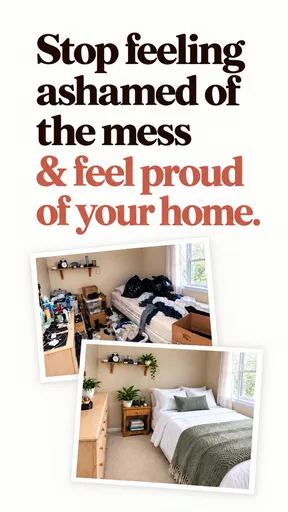
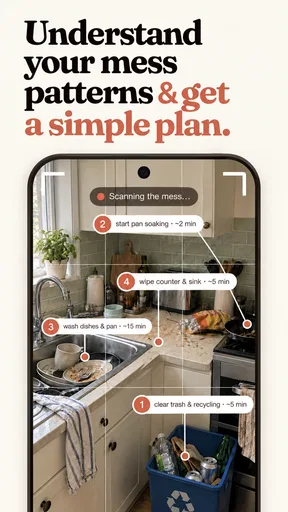
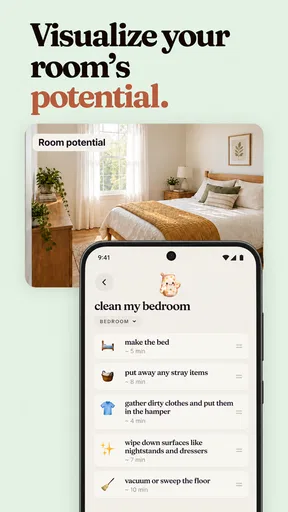
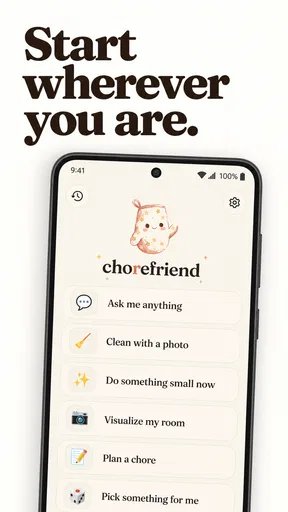
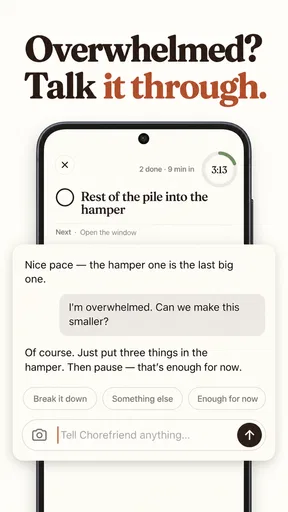
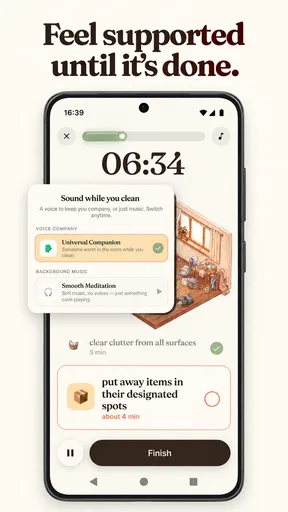

 Analysis by AppCompare
I like household apps best when they make the next small job easier to decide, rather than turning home care into another project to manage. Chorefriend: Cleaning Schedule is aimed at that everyday problem: keeping chores and home planning in one place so routine tasks are less likely to slip through the cracks. I’d consider it for a shared home, a busy household, or anyone who repeatedly has to remember what needs doing next.
That focus is also the app’s clearest strength and its main constraint. It is a home-organizing tool, not a general-purpose planner or a substitute for a detailed household-management system. If your main frustration is that chores are easy to forget or hard to coordinate, the idea is appealing. If you already have a calendar routine that works well, adding another place to track tasks may feel like more upkeep than help.
A chore plan that aims to reduce daily decisions
I focus on the useful promise behind a dedicated chore plan: making recurring household work easier to decide on before a busy day gets in the way. In the next section, I look at how a small, clearly defined routine can help without turning home care into another project to maintain.
Turning recurring work into a visible routine
The most useful way to think about Chorefriend is as a chores tracker and home planner centered on household upkeep. Instead of relying on memory or a vague promise to “clean this weekend,” you can use a dedicated place to keep domestic tasks in view. That matters because many chores are not difficult individually; the friction comes from remembering them, deciding when to do them, and making sure they do not quietly become one person’s responsibility.
In practice, a chore plan is valuable when it answers a simple question: what should I take care of today or soon? A written routine can take that decision out of the moment, when you are already tired or short on time. I find this kind of structure most helpful for jobs that are easy to postpone precisely because they are small: wiping down a surface, tidying a shared area, or catching up on a household task before it becomes a bigger one.
The app’s positioning is more focused than a conventional calendar. A calendar is good at appointments and events, but household maintenance can feel awkward there: the task list may be mixed with work meetings, reminders, and social plans. A dedicated chore tracker gives domestic work its own context. The tradeoff is that you need to decide whether that separation helps you or simply creates one more list to check.
Making the plan useful without overplanning
My practical advice is to start with a small number of chores that cause recurring friction, rather than trying to document every corner of the home on day one. A short, realistic routine is more likely to be used than an ambitious plan that immediately feels like a second job. Once the habit of checking the app has formed, you can decide whether more detail would actually help.
Worth Reading Before You Choose

Flipboard Shows What News Apps Must Do Beyond the Feed

Switching to Android Auto Means Rethinking Your Driving Routine

Google Calendar Makes a Crowded Week Easier to Manage

Ludo King Makes the Most of the Minutes Between Plans

Baby Panda World Brings Quick Play to Modern Phones, but Its Game Library Feels Busy

ESPN’s Live Game View Makes Following Close Games Easier
That approach is especially useful for shared responsibilities. A household can agree on what “done” means for a recurring job before it becomes a disagreement. For example, rather than leaving “clean the kitchen” as a broad instruction, people can agree on the specific task they mean and use the plan to keep that expectation visible. This is a workflow tip, not a claim that the app automatically resolves household negotiations: the people using it still need to settle the division of work.
I would also treat the plan as a guide rather than a rulebook. A chore schedule should make it easier to adjust when the week changes, not create guilt because a task moved by a day. If a routine is too strict for your household, simplify it until it reflects how you actually live. The value of a tracker comes from returning to it, not from building a flawless list once and abandoning it.
A realistic week at home
Imagine two people sharing an apartment while juggling different work schedules. One notices that the bathroom and kitchen need attention, but neither person remembers who last handled which task. A dedicated chore plan can give them a common reference point: they can check what needs attention, make responsibilities visible, and avoid having the same conversation from scratch every few days.
The useful detail in that scenario is not simply that tasks are written down. It is that the household can separate planning from the moment of irritation. Instead of raising a chore only when someone notices it has been missed, both people can consult the same routine and agree on a manageable adjustment. For a solo user, the same principle helps with a different problem: remembering less and choosing a reasonable next task rather than trying to tackle everything at once.
There is also a sensible way to use a planner when your schedule is unpredictable. You can focus on the tasks that keep the home functional and leave less urgent tidying flexible. That distinction prevents a tracker from treating every job as equally pressing. I would not expect any app to decide your household’s priorities for you, but a visible list can make those priorities easier to discuss and revise.
Where a dedicated tracker differs from familiar alternatives
A paper checklist is quick, private, and requires no setup beyond a pen. It can be the better choice if you only have a few chores and enjoy crossing them off on the fridge. A phone calendar may be better if you already check it constantly and want household tasks beside appointments. Chorefriend makes the most sense when you want household work treated as its own ongoing planning category rather than squeezed into either format.
That distinction is useful, but it is not automatically an advantage. A second planning tool only earns its place if the household will actually open it. If one person maintains the schedule while everyone else ignores it, the app may simply make the organizer’s workload more visible without making it smaller. Before adopting it as a household routine, I would agree on who will check the plan and how often everyone will review it together.
For complex home projects, such as coordinating contractors, tracking renovation decisions, or managing a detailed inventory, a chore-focused app may not be the right tool. Those jobs need more specialized records than a routine task planner is intended to provide. I would keep Chorefriend focused on recurring upkeep and use another method for larger projects rather than trying to force one app to handle every kind of home administration.
Fit, cost, and practical expectations
Chorefriend is a free app from System Two GmbH. It has an average rating of 4.6 from around 1.4 thousand ratings, with 98 written reviews, and has passed 10 thousand installs. Those figures suggest that people are finding it worth trying, though ratings alone cannot tell you whether its approach will match your household. The app is rated Everyone, and the current version is 1.0.26; it requires Android 8.0 or later.
There are in-app purchases ranging from $6.99 to $69.99 per item. I would check what is included in the free experience and what a paid item covers before building a long-term routine around anything you may later decide you need. The range is broad enough that it is worth being deliberate rather than assuming every useful part of a household planner is included at no cost. You do not need to make a purchase simply to test whether a dedicated chore plan suits your habits.
One limitation of any tracker is the setup-and-maintenance bargain. You must put enough useful information into it, and revisit the plan when your household changes. If you move, take on a new responsibility, or change work hours, an old schedule can stop being realistic. I recommend a brief household check-in now and then: remove tasks that no longer matter, clarify who owns the remaining ones, and make the routine fit the week you actually have.
Another tradeoff is that a digital plan can create a false sense of completion. Seeing a task listed is not the same as getting it done, and adding more chores does not necessarily make a home more manageable. The strongest use of the app is modest: make a few recurring jobs easier to remember and coordinate. If you find yourself spending more time maintaining the plan than doing the work, pare it back or return to a simpler checklist.
Making the routine survive a busy week
A plan is most useful when it can absorb ordinary disruptions without becoming something you have to rebuild. If an unexpectedly busy day pushes a task aside, I would treat that as a prompt to reassess its urgency, not as proof that the schedule has failed. A simple distinction between essential upkeep and jobs that can wait helps prevent every unchecked item from feeling equally important.
For example, someone coming home late might still want to keep a shared kitchen usable while postponing a less urgent tidy-up. Thinking in those terms before a hectic week begins makes it easier to adapt the household routine calmly. Chorefriend’s value is in giving that plan a home; the judgment about what can move still belongs to the people who live there.
Another practical habit is to review the routine at a time when nobody is already annoyed about a missed chore. A short conversation during a calm moment can clarify what each task includes and whether the current split feels workable. That small step is more likely to make a shared plan fair than simply adding more reminders. The app can help keep agreed responsibilities visible, but visibility is not the same as agreement.
Who is likely to benefit most
I think Chorefriend is best suited to people who want a dedicated place for household routines and are willing to check it regularly. It could be a good fit for roommates who want clearer expectations, couples trying to share recurring tasks more fairly, or individuals who prefer a written plan to carrying every chore in their head. The central benefit is not that it makes cleaning effortless; it helps turn vague intentions into something the household can see and act on.
It is less compelling if you prefer paper, already have a reliable calendar workflow, or do not want to maintain a separate household tool. It may also disappoint someone looking for a comprehensive property-management system or a planner that independently assigns work and settles disputes. Those needs go beyond the app’s core purpose as a chore tracker and home planner.
It is also worth thinking about who will use the plan, not only who will create it. A household where one person is happy to organize and everyone else prefers verbal reminders may find that the app becomes another responsibility for the organizer. Before committing, I would make sure the people sharing the work are willing to consult the same routine. If they are not, a visible paper list or a brief regular check-in may be more practical than maintaining a digital system that only one person sees.
For a solo household, the decision is simpler: the app is useful if you want an external prompt to help you choose what to do next. It is less useful if you already remember your routine and do not enjoy checking lists. Someone who wants a full cleaning guide, step-by-step instructions, or detailed property records should look for a tool designed around those needs instead of expecting a chores planner to provide them.
My recommendation is to begin with a few chores that repeatedly get forgotten, then see whether having them in one dedicated place changes your week. Keep the routine flexible, make responsibilities clear with the people you live with, and judge the app by whether it reduces nagging and last-minute catch-up—not by how elaborate your plan becomes. For that focused use, Chorefriend: Cleaning Schedule is a practical option; for households that already have a smooth system, a simpler list may be enough.
Pros
- Recurring schedules make it easier to keep routine chores from slipping.
- Task assignments can help make household responsibilities clearer.
- A shared schedule can coordinate cleaning across multiple household members.
- Breaking upkeep into smaller tasks can make cleaning feel more manageable.
- A dedicated chore planner keeps household tasks separate from general to-do lists.
Cons
- Everyone may need to use the app for shared planning to be effective.
- Setting up rooms
- tasks
- and schedules takes time at first.
- Frequent reminders may become distracting if schedules are too busy.
- The app may offer less flexibility than a general-purpose task manager.
- It may not suit people who prefer paper lists or informal chore routines.
FAQs for Chorefriend: Cleaning Schedule
What is Chorefriend: Cleaning Schedule used for?
Chorefriend: Cleaning Schedule is designed to help you organize household cleaning and other recurring chores. You can use it to keep track of tasks, plan when they need to be done, and avoid relying on memory alone. It may be useful for individuals, families, or housemates who want a clearer view of shared responsibilities, though the available tools can vary by app version.
Can I use Chorefriend to share chores with family or housemates?
The app is aimed at making chores easier to manage, but the precise sharing and collaboration options depend on the version you install. Before relying on it for a household, check its current store listing for features such as multiple users, shared schedules, invitations, or task assignments. If these are not supported, you may need to manage a common plan manually or use another shared calendar.
Does Chorefriend send reminders for scheduled cleaning tasks?
Reminders can be helpful when you are trying to stick to a cleaning routine, but their availability and behavior may depend on the app version and your device settings. Check whether notifications are offered for individual chores or recurring schedules, then allow notifications in Android or iOS settings if you want them. Battery-saving settings or disabled permissions may prevent alerts from appearing on time.
Is Chorefriend: Cleaning Schedule free to download?
The price and any paid features can change, so check the Google Play Store or Apple App Store listing for the latest details before downloading. An app may be free to install but still offer optional purchases, subscriptions, or paid upgrades. Review the listing carefully to understand what is included at no cost and whether any payment is needed for the features you plan to use.
What should I check before downloading Chorefriend?
Confirm that the app is available for your device, meets its operating-system requirements, and has the features you need for planning chores. It is also worth reviewing recent user ratings, update history, privacy information, and requested permissions on the official store page. These details can change over time, so use the current Android or iOS listing rather than relying on older descriptions.


